Fences Becomes Unresponsive

Fences becomes unresponsive after a period of time, no longer allowing interaction with items

While using Fences, at some point during the day, I do not really have a ballpark of how long or when, but it happens consistently: the Fences software stops responding to user input.  I can no longer right-click on the desktop (on a fence or on the wallpaper).  Fences does not respond to double-clicking on the background (which normally clears the desktop). I can no longer ineract with any of the icons on the desktop.  

However, the software will still organize any new files or icons on the desktop, and the interface will refresh when deleting or adding any files or icons from the desktop via Windows Explorer.  

This issue has persisted after uninstalling and reinstalling the product.  Restarting Explorer does not seem to affect the issue.

While writing this, I just determined that there appears to be a one-inch strip of desktop space I can interact with.   It also appears that if I minimize all items on my desktop, I can interact with it.  However, whenever I open any window or change focus to another application, the issue recurs.   

660 views 11 replies
Reply #1 Top

Hello,

Sorry to hear you are having issues. Need to know more on your system.

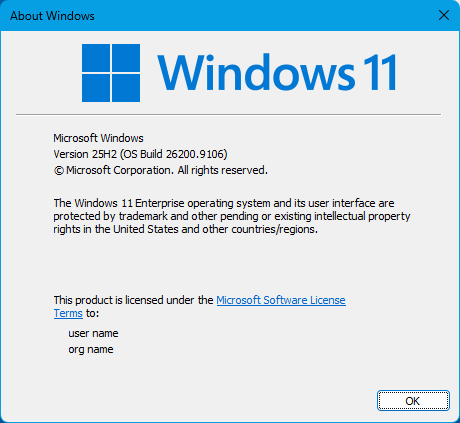
  1. Windows 10 or 11? Also, need to know your Windows full version and OS Build number. Use Winver.exe to get these numbers.
  2. Fences full version installed.

Thank you,

Basj,

Stardock Community  Assistant.

Reply #2 Top

Hi, known problems with v6.52 which were patched out and released; please check out v6.54? If using v6.54 already please let us know.

Direct link available here:
https://forums.stardock.com/r?u=https%3A%2F%2Fstardockcorporation.sharepoint.com%2F%3Au%3A%2Fs%2Fsoftware%2FIQC6v4VusCvVTYVKBNfWZqyDAbkG_KTrb6DEN33aindl67c%3Fe%3Dcia2A1

Reply #3 Top

Long time user, first time posting.

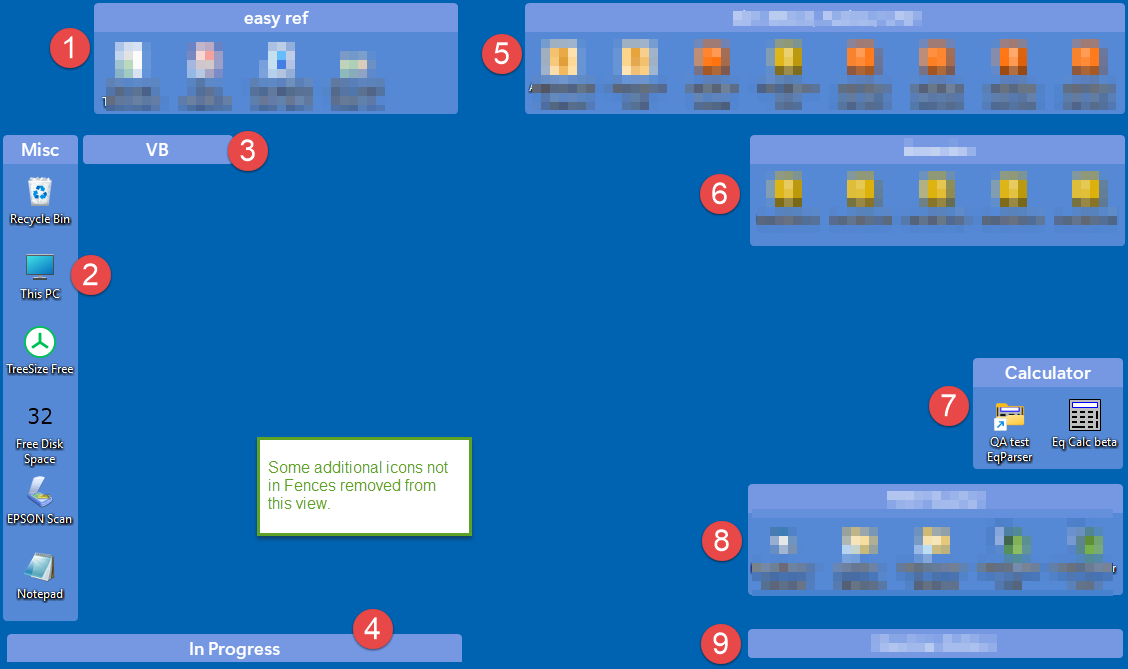
I am having a similar problem to what CthePrez mentions. In my case, I have 9 Fences on my desktop. All fences work when I start my computer. After some time, I can rename the title of Fence 7, but I cannot select the shortcuts. (The shortcuts do not highlight.) I cannot do anything with Fence 8 (meaning I do not get the mouse cursor that lets me change the title, I cannot drag the Fence, I cannot select the shortcuts. Fence 9 is a roll-up/roll-down and does not work at all.

All other Fences are working fine, including the roll-up ones 3 and 4. 

I have not been able to determine what happens that breaks them, but today it was only 2 hours when I noticed the fences stopped working. Somedays the problem does not occur, and previously it has taken several hours before the problem appears. 

I have version 6.54 installed. I turned on advanced logging a few days ago in anticipation of the problem happening again.

John

Reply #4 Top
Quoting JWHoltz, reply 4145563

Long time user, first time posting.

I am having a similar problem to what CthePrez mentions. In my case, I have 9 Fences on my desktop. All fences work when I start my computer. After some time, I can rename the title of Fence 7, but I cannot select the shortcuts. (The shortcuts do not highlight.) I cannot do anything with Fence 8 (meaning I do not get the mouse cursor that lets me change the title, I cannot drag the Fence, I cannot select the shortcuts. Fence 9 is a roll-up/roll-down and does not work at all.

All other Fences are working fine, including the roll-up ones 3 and 4. 

I have not been able to determine what happens that breaks them, but today it was only 2 hours when I noticed the fences stopped working. Somedays the problem does not occur, and previously it has taken several hours before the problem appears. 

I have version 6.54 installed. I turned on advanced logging a few days ago in anticipation of the problem happening again.

John

End of JWHoltz's quote

Hello,

Sorry to hear you are having issues. I have forwarded your problem/question to Stardock Support Team for their assistance. Please keep an eye on this thread for any updates. We appreciate your feedback and patience. Thank you.

Basj,

Stardock Community  Assistant

Reply #5 Top

Hello and thank you for your reports.

I haven't been able to reproduce this issue as described, in the current Fences (6.54) version. 

If the problem continues to occur after reinstalling/updating to the latest version (make sure to reboot after), some more information might be helpful to help identify what may be different: 

  1. Run Winver.exe from Start, then note your exact Windows version and complete build number.  
  2. Check C:\Program Files (x86)\Stardock\Fences for the file version of Fences.exe (right-click -> Properties -> Details).  The exact file version of Fences.exe you have installed is always helpful to confirm.
  3. Any other software/Windows settings you may have could also potentially be conflicting with the behavior of Fences.  For this reason, if possible, it would be helpful to test what happens in a more default state without conflicts.  

If your version of Windows supports it, the Windows Sandbox is great for testing a fresh installation without conflicts.  The guide below has instructions for how:

Another effective testing option is installing Fences from Clean Boot.  The guide below details this method, which is a bit more involved than the Sandbox:

Please let us know if these suggestions help.  Any details that may be different on your end that could be contributing to the issue may be relevant.

Best regards,

Adam McGuinness
Stardock Support Specialist

Reply #6 Top

Hey John, very helpful. Looking forward to looking into the log for hints. (Including, depending if it shows or doesn’t show, ideas of what additional debug info to potentially add.) 

Thanks for your help with this

Reply #7 Top

Hi Adam and Dr W. Thanks for the help. Here's the information I have at the moment.

1. Windows 11 version25H2 (OS Build 26200.9106)

2. Fences.exe file version 6.5.4.1

3. It is a corporation computer, so it is possible there is some policy software or settings that is related. Why it only affects some fences is strange.  So far, I have not identified any specific software or steps that cause the fences to be unresponsive. (I did create a new Fence today because I installed new software. I didn't want to do that and change the setup, but I can't work without the fences keeping my desktop tidy. :-) With any luck, the new fence will fix my issue. lol.
I uploaded the advanced logging files to Jeff B's Dropbox yesterday (Aug 24). The log file was created before I installed new software today (Aug 25) and created a new fence. Hopefully the log will show when I turned the logging on. I noticed the problem a few days before I started the logging. 

My guess is the unresponsive fences started before Aug 18. My "Apps > Installed apps" list shows 2 dozens installations between Aug 1 and Aug 18: XBOX (huh?), MS Windows App Runtime Singleton, CrowdStrike, printer support, Windows Clock, Notepad, ... some of these may be updates instead of a new install. In other words, the list is just the usual updates that happen without my knowledge. Otherwise, the software I use on a daily basis are Microsoft software (Outlook, Words, Excel, Teams), Slack, CAD software (Autodesk Inventor), Zoom, and TechSmith Snagit screen capture utility. 


So far, fences 7, 8, 9 have not broken, but the day is still young.

John


Reply #8 Top

Yoikes!! Got it. We checked it out, thank you for submitting.

So, two logs. One is the helper exe + config UI, the other is the shell extension itself. Both are exaustive in nature especially when Advanced is on. First pass, it's all looking quite normal. The helper exe one, which is always enabled, goes back to 8/12 and before/after 8/18 look quite similar. Upgraded from 6.5.2.7 to 6.5.4.1 on 8/19, but I'll say that 6.54 was a few-line quick-follow patch to 6.52 that was both unlikely to cause issue and again no frantic activity showing up in the shell extension log, which would indicate it's thrashing.

Will have to continue with thinking cap on here and yes keep looking to resubmit during the next.


Based on the description though, it does sound like something goes haywire with possibly codesigning verification, mid-flight. Which COULD be certificates installing on the machine. All of the symptoms describe feel like they align with a soft-lock, but the only logging in the app is around soft-locking at program startup not mid-flight, which would be tricker to figure out. Again we will thinking cap 🧢

Reply #9 Top

Here's some more information.

  1. The fences 8 and 9 stopped working again. My computer was asleep for 5 hours. There is a possibility that the display going to sleep is related to the problem which is why it usually happens later in the day. More times that the computer goes to sleep.
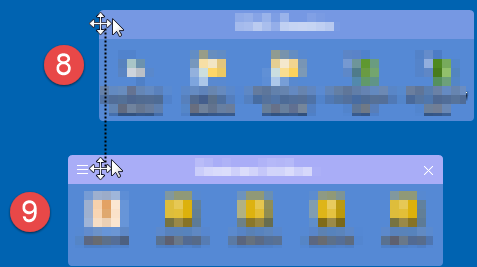
  2. See the image below (Figure 1) for the following description.
  3. Fence 8 behaved like this after it stopped responding. Put the mouse in the title bar anywhere to the right of the vertical line, and the cursor was the normal arrow and the title bar would highlight. Right-click does nothing. (In fences 1-7, putting the mouse in the title bar changes to the double-cursor, and right-click gives the context menu.)
  4. If the mouse is moved to the far left end of fence 8 (to the left of the vertical line), the cursor changes to the double arrow, and the right-click works! It is shear luck that there is a 7 pixel area (approximately) in fence 8 that works!
  5. Now to fence 9 which I turned off the roll-up and managed to move the fence a few pixels. Probably not a coincidence, but the mouse cursor behaves the same way to the right and left of the same vertical line! (Same line as far as I can eyeball.) Because fence 9 is moved a bit to the left, the area where the cursor works is magically larger.
  6. For lack of a better description, it seems the title bar response area for fences 8 and 9 is shifted way to the left.
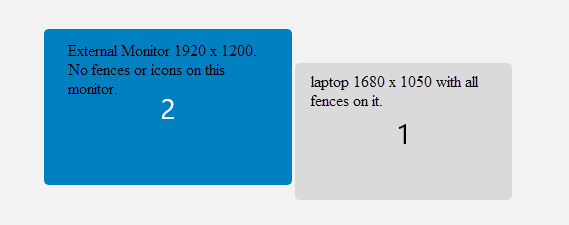
  7. I'm using a laptop with a screen resolution of 1680 x 1050 and 100% scale.
  8. The other possible cause of the behavior is unplugging a second monitor and plugging it back in. I definitely unplugged the second monitor today after closing the laptop lid, and plugged it back in before opening the laptop lid. Monitor 2 is set to 1920 x 1200 and 100% scaling, and it located to the left of the laptop. See Figure 2. (I thought maybe fences 8 and 9 were below the bottom of monitor 2, but that does not explain why fence 4 works since it is as low as fence 9.)

I'll see if I can find updated graphic drivers and try to reproduce this behavior after rebooting to see if it is related to the computer sleeping or disconnecting the second monitor.

Figure 1. Fence 8 has approximately a 7 pixel area at the extreme left where the mouse works. Although the left-most icon will highlight when the mouse is over it, the icon only works if the mouse is to the left of the vertical line when double-clicking the icon! The title bar of fence 9 behaves the same relative to the vertical line. However, all 5 icons work in fence 9!

Figure 2. Layout of two monitors, from the Windows > Display settings.

John

Reply #10 Top

Weirdly, I'm getting the feeling this has to do with the monitor changes & sleeps! We are investigating.

Reply #11 Top

Continuing to investigate – team is diving into the logs now.

"but that does not explain why fence 4 works since it is as low as fence 9" – I think the hypothesis emerging here may be that 4 is "as low", but only 8 & 9 are outside of the bounds of 1680x1050!

"If the mouse is moved to the far left end of fence 8 (to the left of the vertical line), the cursor changes to the double arrow, and the right-click works" – and from this anomaly, feels like this one is right on that boundary!

"Restarting Explorer does not seem to affect the issue." – key info that it doesn't have to do with transient resolution management, which feels sortof wild, and makes this seem like it should be very reproducible.

fab detail again ty. more soon ✅