Start11 v2.81 - start button missing on the primary display


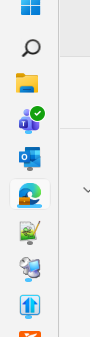
I have 3 monitors, with the center one (#2 being the primary) 

I have taskbar on the left side of my monitors.

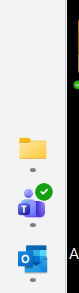
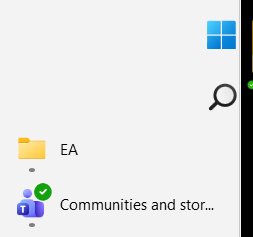
The start button displays normally on non-primary monitors #1 and #3 


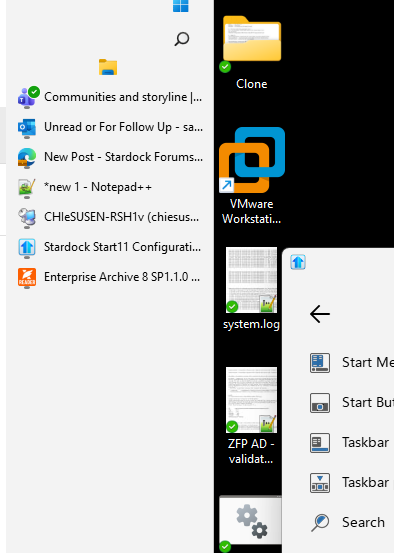
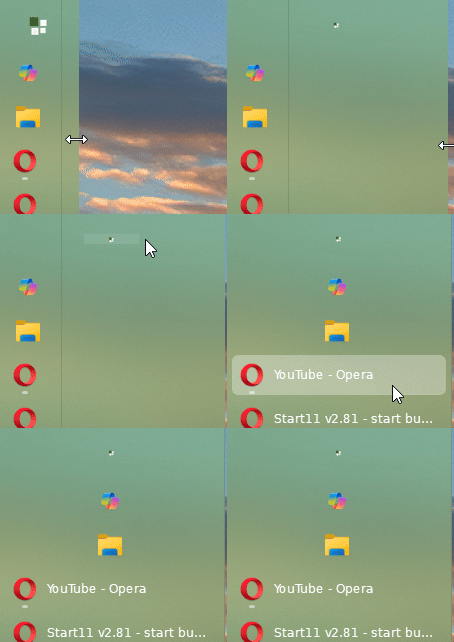
But on the primary monitor #2, it is missing - when I expand the width of the task bar, I see it there.


Help! 

865 views 11 replies
Reply #1 Top

Hello,
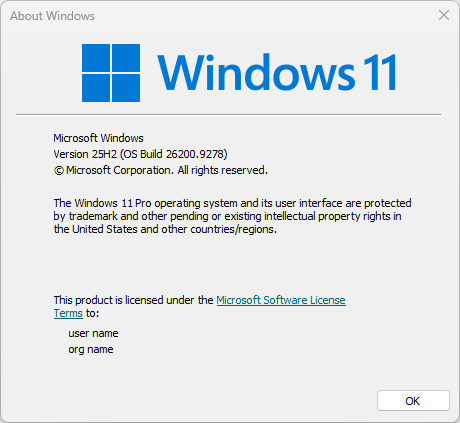
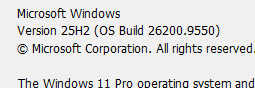
Sorry to hear you are having issues. We need to know your Windows 11 full version and OS Build number. Please use Winver.exe to get these number. Something like my screenshot below.

Thank you,
Basj,
Stardock Community Assistant.

Reply #2 Top


I'm also having another issue now that I didn't earlier. 

When I click on an icon in the task bar, it does bring the window up top. 

Reply #3 Top

Please try, uninstall Start11, reboot immediately (important), download latest version available in your account product download page: https://store.stardock.com/myaccount/products. Install it, reboot immediately again. Retest it and report back.

Also, are you a touch capable system?

Thank you,

Basj,
Stardock Community Assistant

Reply #4 Top


I already did.

After rebooting, the issue with "click on an icon in the task bar, it does bring the window up top" is not occurring, but my initial issue is still there. 

However, the original issue with taskbar is still there.

At normal size

Dragged taskbar wide

Reply #5 Top
Quoting basj, reply 4148171

Also, are you a touch capable system?

End of basj's quote

How about this question?

Next, would like to suggest trying Clean boot steps: https://support.stardock.com/space/SHC/1334935592/Start11+Clean+Boot. Do note that Clean boot need to be done with care. Try it and report back.

Thank you,

Basj,
Stardock Community Assistant

Reply #6 Top

Issue 1: I have the exact same issue on a brand new install of Windows 11,  with the latest trial version of Start11, installed today. With the taskbar on the left, the 'Windows' button, the Search button and the Tasks button all appear stuck to the side / hidden just as Sahir showed. I only have a single screen/monitor.

For further info, if I choose a 'custom start menu icon', this appears more correctly positioned - but absolutely tiny. Search and Tasks still not showing.

Issue 2: Choosing a larger icon (e.g. DefaultLarge) makes it appear almost manageable size, but if you make the taskbar wider it gets smaller? 

  

Issue 3: Start and app buttons only display visibly and in correct locations if 'task view' or 'search' is showing. Unticking Tasks and Search from appearing in the Windows Taskbar settings makes everything bunch up to the top so much the start button is obscured. All above screenshots are with 'Task view' enabled in windows taskbar settings, below is with this disabled:

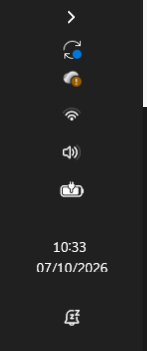
Issue 4: The vertical stack of system tray icons is highly inefficient, and the clock is slightly obscured:

Clearly some work is needed for your software developers with the latest windows versions.

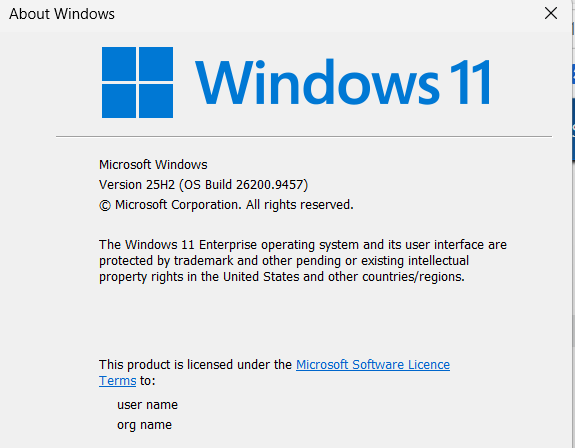
Stardock version 2.81. Win Version:

Reply #7 Top
Quoting louis101, reply 4148174

Issue 1: I have the exact same issue on a brand new install of Windows 11,  with the latest trial version of Start11, installed today. With the taskbar on the left, the 'Windows' button, the Search button and the Tasks button all appear stuck to the side / hidden just as Sahir showed. I only have a single screen/monitor.

For further info, if I choose a 'custom start menu icon', this appears more correctly positioned - but absolutely tiny. Search and Tasks still not showing.

Issue 2: Choosing a larger icon (e.g. DefaultLarge) makes it appear almost manageable size, but if you make the taskbar wider it gets smaller? 
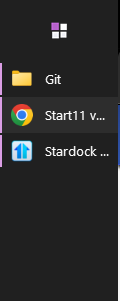
  

Issue 3: Start and app buttons only display visibly and in correct locations if 'task view' or 'search' is showing. Unticking Tasks and Search from appearing in the Windows Taskbar settings makes everything bunch up to the top so much the start button is obscured. All above screenshots are with 'Task view' enabled in windows taskbar settings, below is with this disabled:

Issue 4: The vertical stack of system tray icons is highly inefficient, and the clock is slightly obscured:

Clearly some work is needed for your software developers with the latest windows versions.

Stardock version 2.81. Win Version:

End of louis101's quote

Hello,
Sorry to hear you are having issues. I believe I can reproduce this one. I have forwarded your problem/question to Stardock Support Team for their assistance. Please keep an eye on this thread for any updates. We appreciate your feedback and patience. Thank you.


Basj,
Stardock Community Assistant


Basj,
Stardock Community Assistant.

Reply #8 Top

Thanks Basj.

If anyone else is struggling with the lack of a Task View button, I have a workaround using a custom shortcut.

In Desktop (or anywhere), create a new shortcut and point it to the following path:

 %windir%\explorer.exe shell:::{3080F90E-D7AD-11D9-BD98-0000947B0257} 

Then, just drag and drop this shortcut onto the taskbar to pin it where you want it. Works perfectly for me.

I also moved the shortcut to the start menu folder after creation

Reply #9 Top
Quoting basj, reply 4148176
Quoting louis101, reply 4148174

Issue 1: I have the exact same issue on a brand new install of Windows 11,  with the latest trial version of Start11, installed today. With the taskbar on the left, the 'Windows' button, the Search button and the Tasks button all appear stuck to the side / hidden just as Sahir showed. I only have a single screen/monitor.

For further info, if I choose a 'custom start menu icon', this appears more correctly positioned - but absolutely tiny. Search and Tasks still not showing.

Issue 2: Choosing a larger icon (e.g. DefaultLarge) makes it appear almost manageable size, but if you make the taskbar wider it gets smaller? 
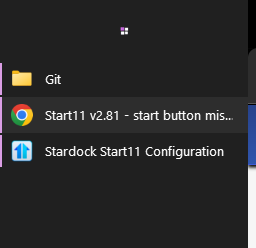
  

Issue 3: Start and app buttons only display visibly and in correct locations if 'task view' or 'search' is showing. Unticking Tasks and Search from appearing in the Windows Taskbar settings makes everything bunch up to the top so much the start button is obscured. All above screenshots are with 'Task view' enabled in windows taskbar settings, below is with this disabled:
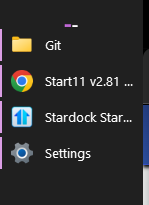
Issue 4: The vertical stack of system tray icons is highly inefficient, and the clock is slightly obscured:
Clearly some work is needed for your software developers with the latest windows versions.

Stardock version 2.81. Win Version:
End of louis101's quote

Hello,

Sorry to hear you are having issues. I believe I can reproduce this one. I have forwarded your problem/question to Stardock Support Team for their assistance. Please keep an eye on this thread for any updates. We appreciate your feedback and patience. Thank you.


Basj,

Stardock Community Assistant


Basj,

Stardock Community Assistant.

End of basj's quote

I can see this reproduce, but only for when using a particular custom Start button (the one called "Default").  I will have that logged.

Internal reference: ODNT-12628

If there are other issues with Taskbar alignment, a workaround that may help, if your Windows build has newer taskbar position options:

1. In Start11, go to the Taskbar tab and find Taskbar position. For your primary monitor, choose "Allow Windows to control taskbar position". 

2. In Windows, go to Settings > Personalization > Taskbar > Taskbar behaviors, and set Taskbar position to Left.

Best regards,

Adam McGuinness
Stardock Support Specialist

Reply #10 Top

Really? If I let Stardock let windows manage it, then why do I need Stardock at all? 

Note that Windows vertical taskbar has done negatives : all windows of the same application are grouped and you cannot ungro up them. That's a showstopper

Fix the Stardock vertical taskbar missing start button

Reply #11 Top

Hi Sahir,

Quoting Sahir, reply 4148801

Note that Windows vertical taskbar has done negatives : all windows of the same application are grouped and you cannot ungro up them. That's a showstopper

End of Sahir's quote

Understood, thanks for explaining why the Windows option doesn't work for you.

Looking at this again, your report is different from the issue I reproduced and logged.  To reproduce anything else on our end, we'd need a bit more information.

Please also note that the Align Left and Align Right taskbar positions are marked as "Experimental" in Start11.  As such, details and testing from users like you are a big part of getting them working properly. 

Could you answer the following:

1. Is your system touch capable? Basj asked this earlier.

2. Have you tried the Clean Boot steps Basj linked? 

https://support.stardock.com/space/SHC/1334935592/Start11+Clean+Boot 

3. Is "Let Start11 enhance the taskbar" On or Off?

4. What resolution and Windows scale setting is each of your three monitors using?

Once we have that, we can try to match your setup.

Best regards,

Adam McGuinness
Stardock Support Specialist