Start11 v2 Release (2.81) Feedback

With the Start11 v2.81 release today, we are creating this thread so that users can report any observed issues.  

Obtaining the product

Object Desktop members can get the release from within Object Desktop Manager 

Individual purchases (as well as Object Desktop Members) can also be obtained from your account page: https://store.stardock.com/myaccount/products

For guest check-out purchase (no account), from this link: http://www.stardock.com/support/productkeyretrieval

Reporting an issue

Please include the following for anything found:

  • Exact Windows version \ build (winver.exe)

  • Detailed steps to recreate the issue seen

  • Screenshots and videos are very helpful.  Videos can be uploaded to a cloud drive service (GoogleDrive, DropBox, OneDrive, YouTube), with a shared link included in your post.  Images can be copied and pasted directly into a post.

  • If there are specific apps that the app does not work (well) with, please note what apps and their exact versions.  If any app is not common, a link to a trial version would be appreciated.

Thank you for your interest and any time you put into making Start11v2 a better product.

176 views 5 replies | Pinned
Reply #1 Top

Date

9/21/2026

Version

  • UI: 2.81

  • File version: 2.8.1.0

Changes

  • Fixes taskbar alignment problem with centered taskbar icons on secondary displays when the taskbar is at the bottom.

Reply #2 Top

***Reserved***

Reply #3 Top

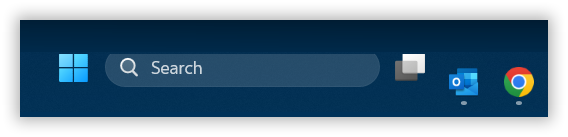
Start button

Start button is misaligned. It's too high up. 2.81. Windows 11 [Version 10.0.26200.9457] Primary monitor.

Reply #4 Top
Quoting jimvaughan, reply 4147313

Start button is misaligned. It's too high up. 2.81. Windows 11 [Version 10.0.26200.9457] Primary monitor.

End of jimvaughan's quote

Hello,
Sorry to hear you are having issues. Please try, uninstall Start11v2, reboot immediately (important), download latest version available in your account product download page: https://store.stardock.com/myaccount/products. Install it, reboot immediately again. Retest it and report back.

Thank you,
Basj,
Stardock Community Assistant.

Reply #5 Top

I do  not understand why you release "Stable Versions" when you have pending bugs that are no yet corrected. I posted about how the right click on the battery behaves and got no answer. Now everytime I boot I have to deactivate the enhanced taskbar, click on the battery on the Windows 11 taskbar and back activate it to have it working for the rest of the session. This is irritating, I spend time to pinpoint the bug, commented extensively and what I see is just a new version with nothing solved