Fences Corner Radius feature req

Maybe I'm just clueless or something, but is there no way to change the corner radius appearance of fences? I know there's a way to completely square the corners of fences, but I would love it if there was a way to customize the corner radius in px for more user control and appearance integration.

Cheers

88 views 4 replies
Reply #1 Top

Hello,

Unfortunately, there is no known feature within Fences configuration setting for it.

Thank you,

Basj,

Stardock Community  Assistant.

Reply #2 Top

Hi helios,

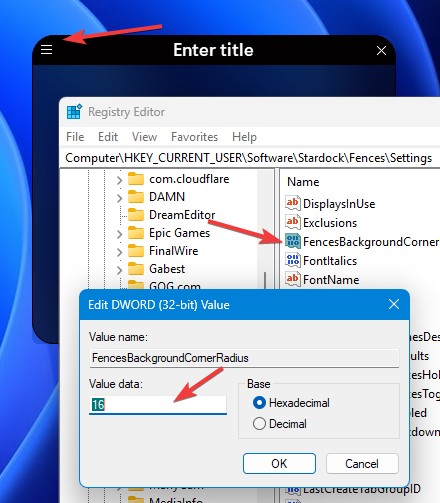
Yes, there is an undocumented switch at "FencesBackgroundCornerRadius". You can set this at 

HKEY_CURRENT_USER\Software\Stardock\Fences\Settings

(DWORD) FencesBackgroundCornerRadius = 4

Press F5 and it should refresh, though and explorer restart may be necessary.

We've noticed that the background blur does not seem to obey changed values given it's undocumented state, so we've made note to get that fixed for the next release.

Any specific type of look you're working to recreate, that might be helpful for our team to consider?

+1 Loading…
Reply #3 Top

Ah wait this is cool, so am I understanding correctly that in order for the corner radius to change I should regedit and add this DWORD? I wasnʻt able to find it there by default under the Fences settings folder in the registry editor, so I just assume that Iʻd add it as a new value.

Since Iʻm using fences on desktop with a widget that boasts a more generous corner radius, I was looking for a way to make the fences match it (which visually looks better to me). 

Reply #4 Top

I tested this one, I have to manually added it. Need to restart Explorer.exe to see the changers. In the screenshot I set to 16 but its too much for me, I change it down to 8. 

Thank you,

Basj,

Stardock Community  Assistant