
Text in Right-Click of Start menu

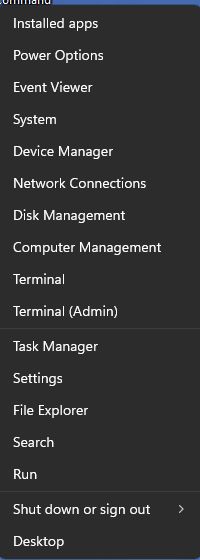
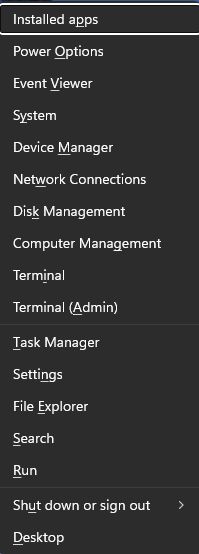
I have noticed, with Start11 2.72 (and previous) under Win 11 that right-clicking the start menu (to get the text list of Settings, Event Viewer, etc...) tends to vary. Sometimes it is just plain text. Sometimes it has hotkey letters underlined. I'm not sure why it's not consistent.

Not a big deal, just something I noticed. I tried to get a screen grab, but that doesn't work for it.
154 views 8 replies
Reply #1 Top

Hello,

Sorry to hear you are having issues. But, need to know which area on the Start menu you're referring to? A screenshot would also help us understand it.

Thank you,

Basj,

Stardock Community  Assistant.

Reply #3 Top

Thank you for posting the screenshots. I have forwarded your problem/question to Stardock Support Team for their assistance. Please keep an eye on this thread for any updates. We appreciate your feedback and patience. Thank you.

Basj,

Stardock Community  Assistant

Reply #4 Top

Hi Andyross64, thank you for posting.

Quoting Andyross63,

I have noticed, with Start11 2.72 (and previous) under Win 11 that right-clicking the start menu (to get the text list of Settings, Event Viewer, etc...) tends to vary. Sometimes it is just plain text. Sometimes it has hotkey letters underlined. I'm not sure why it's not consistent.

Not a big deal, just something I noticed. I tried to get a screen grab, but that doesn't work for it.

End of Andyross63's quote

I see a consistent difference depending on if I right-click or use Windows Key + X to open that menu.  That seems to be related to an accessibility setting for Windows ("underline access keys").  I expect you'd find the same results even without Start11.

Best regards,

Adam McGuinness
Stardock Support Specialist

Reply #5 Top

That would be right.  If Windows thinks you are using the keyboard it shows the underlines.

Reply #6 Top

Then it must be some interaction on how Start11 talks to Windows. I never really use the keyboard shortcuts.

Reply #7 Top

I think I may have found one clue. I have my taskbar set to hide when not needed. It seems if I pull the mouse down to the start button (which is set to left-side, not center) and it pops up and I quickly left-click, I get the underlines. If the bar is already up, or I pop it up and move the mouse over to the left, I don't get the underlines. Although even that seems a bit hit-or-miss.

Reply #8 Top
Quoting Andyross63, reply 3994932

I think I may have found one clue. I have my taskbar set to hide when not needed. It seems if I pull the mouse down to the start button (which is set to left-side, not center) and it pops up and I quickly left-click, I get the underlines. If the bar is already up, or I pop it up and move the mouse over to the left, I don't get the underlines. Although even that seems a bit hit-or-miss.

End of Andyross63's quote

That inconsistency is still not reproducing for me with AutoHide.  There could be a variety of things (software or hardware conflicts, changes to your Windows configuration/settings, etc) on your end. 

A good way to rule out Start11, if possible, would be to see if it happens in a Windows Sandbox.  

Testing Start in Sandbox - Documentation - Stardock Help Center

Best regards,

Adam McGuinness
Stardock Support Specialist