Deskscapes 2026

I searched the Forums and haven't found a reference to this issue, so maybe it hasn't been addressed.

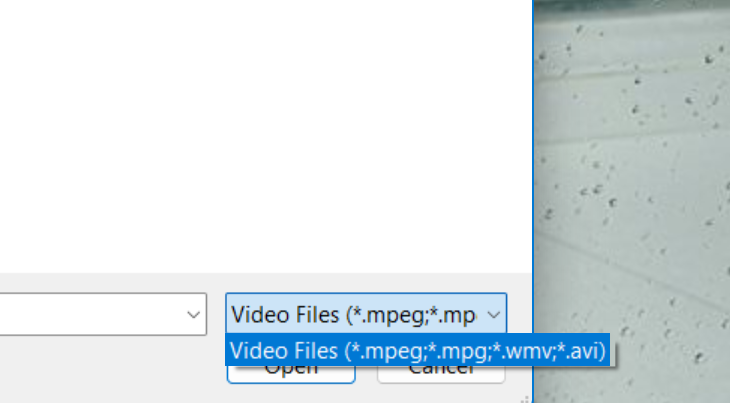
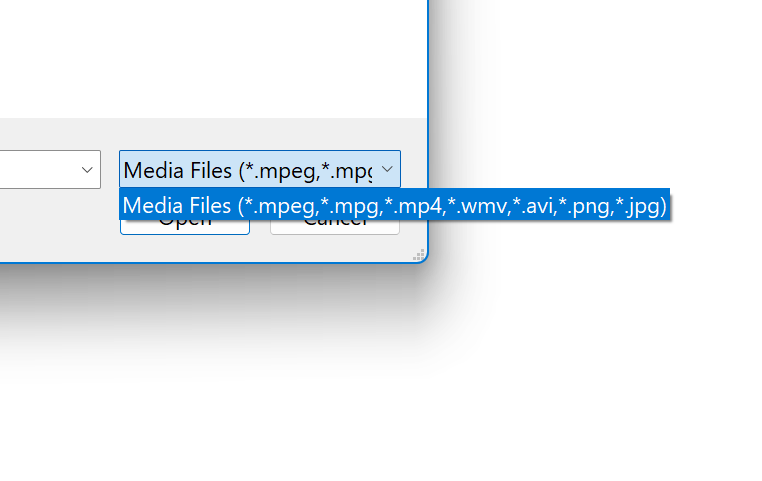
In the previous edition of Deskscapes, when using DreamMaker, you were allowed to use mpeg, mpg, mp4, wmv, avi, png, or jpg files to create a Dream with a single video file. In Deskscapes 2026, you are only allowed to use mpeg, mpg, wmv and avi.

Is support for the other file types going to be reinstated? My issue is particularly with the mp4 files as I commonly use them to make 4K Dreams.

This is Deskscapes 2026 using DreamMaker 3
This is the previous version.
Thanks for looking into this.


288 views 5 replies
Reply #1 Top

Hello,

Sorry to hear you are having issues. I have forwarded your problem/question to Stardock Support Team for their assistance. Please keep an eye on this thread for any updates. We appreciate your feedback and patience. Thank you.

Basj,

Stardock Community  Assistant

Reply #2 Top

Hi Tellisbd,

Thank you for posting.

Quoting tellisbd,

In the previous edition of Deskscapes, when using DreamMaker, you were allowed to use mpeg, mpg, mp4, wmv, avi, png, or jpg files to create a Dream with a single video file. In Deskscapes 2026, you are only allowed to use mpeg, mpg, wmv and avi.

Is support for the other file types going to be reinstated? My issue is particularly with the mp4 files as I commonly use them to make 4K Dreams.

End of tellisbd's quote

With the current DeskScapes2026 and the included DreamMaker, it does seem that after clicking the "Browse" button for video files in DreamMaker, "mp4" isn't included on the listed file types.  

However, I tried browsing to a .mp4 file on my desktop anyway.  After selecting it, I was able to use that mp4 file to create a Dream anyway.  Does this work for you?

Best regards,

Adam McGuinness
Stardock Support Specialist

Reply #3 Top

Hi Adam,

Tested this morning. Dreammaker 3 only shows files as in the shot above, it won't recognize any other files. Some programs will have a "All Files" or "Show All Files" drop down option, but my 2026 does not and I cannot select an mp4 file. Can't force an mp4 load.

I have loaded the old Dreammaker separately, without downloading the old Deskscapes. It won't allow "All Files" or other file options either, although it does allow me to see and use mp4's.

If you are dragging and dropping the mp4, I'm not sure how that's possible in the program parameters. Maybe my fault.

Thanks for looking into it.

BT 

Reply #4 Top
Quoting tellisbd, reply 3994329

I have loaded the old Dreammaker separately, without downloading the old Deskscapes. It won't allow "All Files" or other file options either, although it does allow me to see and use mp4's.

End of tellisbd's quote

Thank you for checking and clarifying.  I seem to have done the same as you, and I can see how that can be confusing with two different DreamMakers.  I will have this logged.

Internal Reference: ODNT-12458

Best Regards,

Adam McGuinness
Stardock Support Specialist

Reply #5 Top

Hello again,

Following up here to let you know, DeskScapes 26.01 beta has now been updated to 26.0.1.1.  For details and feedback, please see:

https://forums.stardock.com/541745/deskscapes-v-26-01-beta-feedback/page/1

Thanks again for your time, feedback, and support. 

Best regards,

Adam McGuinness
Stardock Support Specialist