
Myths & Facts about WindowBlinds

Myths & Facts about WindowBlinds

Because WindowBlinds has been out now for half a decade and it has changed so dramatically over the years, there are a lot of misconceptions about how WindowBlinds works.

MYTH: WindowBlinds is a memory hog.

FACT:  No. WindowBlinds not only uses very little memory but it actually uses LESS memory than the bundled themes do. That's because WindowBlinds visual styles are designed to use less memory since its skin format was designed during the days when users had fewer resources.

The Wbload.exe process in the Windows task list.


MYTH: WindowBlinds will slow down your computer.

FACT: To a certain extent, anything you load onto your machine will slow it down by some amount. The question is, will a given program slow down your computer noticeably. In WindowBlinds' case, it shouldn't slow down your computer. Thanks to hardware acceleration and using extra video RAM on most new cards, WindowBlinds should be noticeably faster than using the bundled themes in Windows XP.

MYTH: WindowBlinds isn't as compatible or will crash my programs

FACT: WindowBlinds, because it's a commercial product, has to provide additional value over the included themes in Windows XP. One of the ways it does this is by defaulting to skinning non-theme aware programs. Of course, some programs just don't like being skinned. Those apps can be added to the exclusion list. Most existing software is excluded by Microsoft's theme engine. But you can do the same thing with WindowBlinds if you are concerned about compatibility over consistency:
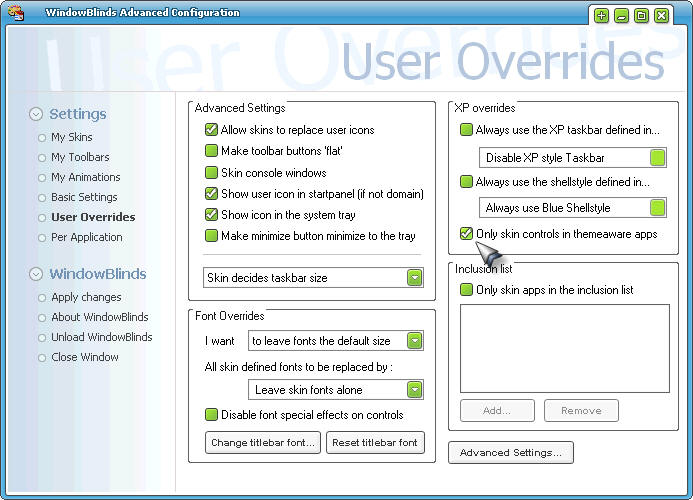
You can tell WindowBlinds to only skin theme aware programs and have identical compatibility to Windows XP's bundled themes.


MYTH: All the WindowBlinds visual styles are big and ugly.

FACT: There are thousands of WindowBlinds visual styles on the net. And it can also import in .msstyles files if you have SkinStudio installed. Because WindowBlinds is very flexible, skinners tend to make skins that they want to make with little limitation. So that creates more variety. But sites such as WinCustomize.com do have ways of filtering visual styles so you can find the ones you want.

For example, if you want to see the Admin picks of WindowBlinds visual styles, you can go here. That doesn't mean you'll like what they picked but they are skins that other people have liked.

30,426 views 69 replies
Reply #1 Top
Myth: Windows is Ugly

Fact: Not with Windowblinds. The rest pale in comparison.

Good thread Frogboy!!
Reply #3 Top

One myth I would really like to know the source of is where people came to believe that WindowBlinds uses more memory or is a memory hog?

It's never used very much RAM and now that it's down to using a trivial amoutn, you still have people claiming it uses a lot of memory. Notepad uses more RAM than wbload does for crying out loud.

And then people blow off the size of msstyles. The luna.msstyles is 4 MEGABYTES in size. Luna WindowBlinds visual style is >1 megabye.  That doesn't directly translate into how much RAM they use but it does give you an idea on how efficient the skin formats are which does translate some into memory use.

Reply #4 Top
Brad, that is just a simple tought, I tought the very same thing before I started getting into skinning. (not that I did care )
Skinning your pc with heavy graphics but still keep the explorer running?
These days a lot of programs just use a lot of memory, most of the time because coders just can't write hard code anymore.

I never had any problems with memory while running WB.... well, maybe one but that was when I made the startpanel half-transparant lol.
Reply #5 Top
Nice thread froggy.

I think there'll always be two camps when it comes to this. Some people will swear by MSstyles , some by WindowBlinds. I've made my choice and happy with it.

OD rocks
Reply #6 Top
People seem to prefer blaming skins for "slow down" rather than thinking of what other programs is sucking up
Reply #7 Top
you mean it isn't windowblinds but the fact I am running my virus checker, defragging and using photoshop at the same time that my computer is running slow!?!?!?
Reply #9 Top
Memory hungry? BUY MORE MEMORY! DUH!! A chip at a time if ya *have* to. It's cheap now


Powered by SkinBrowser!
Reply #10 Top
yes! the answer to all computer problems is simply to UPGRADE your hardware! hehe.. i like that
Reply #11 Top
I think the Memory Hogg, issue comes from way back in the early days.
Like in the early Pre and 1.xx Days, and WB was getting the wrinkles,
knocked out. Also as alot of folks are and were, using less, Stable OS's,
Win98, 98SE, WinMe, and God Forbid Win95, and these are prone to Memory, Bleeds. So thier sluggishness, has an explanation, besides the Hardware obvious. But Owing to the fact that alot of folks have been through the Support wringer, of some companies, and the first line of defense there, is "The Blame Game." I think alot of issues, folks run into, is what I call "Toxic Software Syndrome." This Syndrome comes from all the Shareware and Freebie, Items building, in a person's System until, something writes to the registry, interferes w/ system files/dll's/ocx's and the like, and the scales of the System are tipped to the Unstable & the user startes killing running Applications until Stability returns, and The last killed is deemed, the culprit, irregaurdless of the validity, of the assumption. My Father subscribes to this ideology, and practice, so I see it alot, as I also see alot of my Relatives and other folks I help support (System) wise. Shareware/Freebie Junkies, Usually have Unstable Systems. Don't get me wrong, there is nothing wrong with Using and Trying Software, I am just pointing out the fact that, installing/removing software constantly, on the older OS's was a crap shoot, anyways. Sorry to rant, just my $.02
Reply #12 Top
Yes, I think it comes from the days of Win98 users. Remember WinXP replaced Win98SE. Most users preferred Win98SE to Win2000 or WinME. And Win98SE handled memory in a terrible way compared to WinXP. Win98SE had lots of memory leaks. With Win98SE my system dragged with Windowblinds and Object Bar alone. It is much different in WinXP.
Reply #13 Top
ChasUGC: Oh yes. You wouldn't beleive my performance with wb and ob! add dx to it, and you are limping along!(I don't care either!)
Reply #14 Top
Remember WinXP replaced Win98SE


NO - Windows ME replaced 98SE. Then XP replaced ME.
Reply #16 Top
jadkins - its called blanco
Reply #18 Top
Home User: Win95, Win98, Win98SE,WinMe, WinXP Home Ed.
Business User Win 3.1, Win 3.11 for workgroups,Win95, WinNT 3, WinNT 4, Win2K (sp blah,blah,blah), WinXP (sp blah,blah). I think that was the migration path.
Not including the 1.0 and 2.0 BS versions of Windows. I think I got them all.
Not to drag this to far off topic.
Brad has a good point, when it comes to resource usages, and the innovations in hardware. I think one of the things that need to be remembered, is that alot of machines are making the tour of the circuit, and coming into popular use. I see Sub 1GHZ, in the FleaMarket, heck you see even Original Pentiums, still in the FleaMarkets, and people are taking to them in droves. This is the Market you must not leave behind, and this is the group that will fall prey to the fallacies, and myths, Brad is reffering to. I only hope that the development of the NonXP versions of WB and OD, continues, as much as can be expected with OS limitations.
Reply #19 Top
windowblinds ate my homework!!
Reply #20 Top
Dude windowblinds never times up that much memory!! goddamned idiots

Windowblinds is not ugly too, it's the sole app that made my windblows Xp not look so damned bad!!

and on top of that, it's never crashed ANY programs for me, especially my games!!
Reply #21 Top
the issue with 9x and ME isn't the memory .. it's that 128k GDI heap I believe . Us NT based OS using peeps ( 2000/XP ) don't have that problem ( well 1GB of RAM helps too )
Reply #22 Top
Thanks to hardware acceleration and using extra video RAM on most new cards, WindowBlinds should be noticeably faster than using the bundled themes in Windows XP.


Has Nvidia ever enabled this in their drivers or does this still only apply to ATI and Matrox cards?
Reply #23 Top
"One myth I would really like to know the source of is where people came to believe that WindowBlinds uses more memory or is a memory hog?"


When Windowblinds debuted the average computer had, what, 32 megs of ram, tops? Maybe 64? The computer I bought in 1998 had 96 megs and I thought that was plenty.

That said, WB using 10-20 megs in 1999 is very different than WB using 10-20 megs in 2004. I mean, 20megs out of 64 hurts, but 20 megs out of the 1000megs presently have isn't even noticeable. Winamp 5 gets the same flack, I think it is silly. People with 256+ megs of ram complaining about 20.

Make yourself a 24x36 image in Photoshop with about 90 layers, then come back and talk about RAM.
Reply #24 Top

"Make yourself a 24x36 image in Photoshop with about 90 layers, then come back and talk about RAM."

I did that, kinda gave me the BSOD... But it was fun... I love trying to lag the hell out of my computer.