GPU-Z Free GPU and Video Card Utility


Picked this one up on Neowin.net (via Hankers - ty, Hank) . It was also mentioned as download #2 for the week on cnet (I think…deleted that email).

Snowy, I hope this one will keep that new card of yours under your supervision. ;)

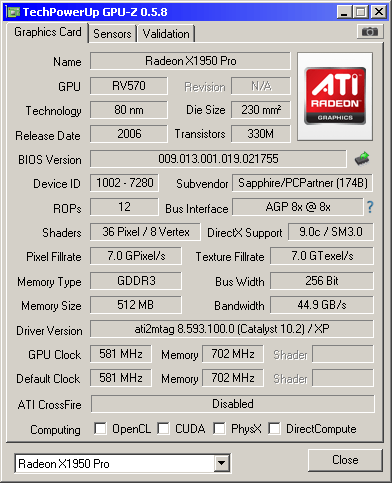
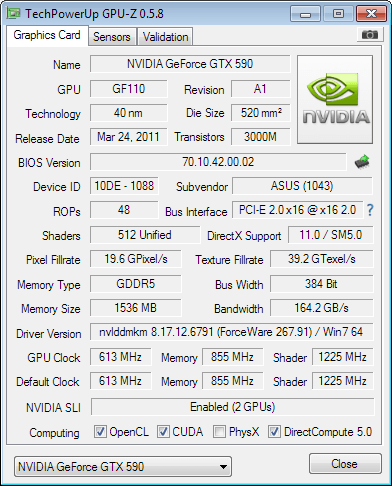
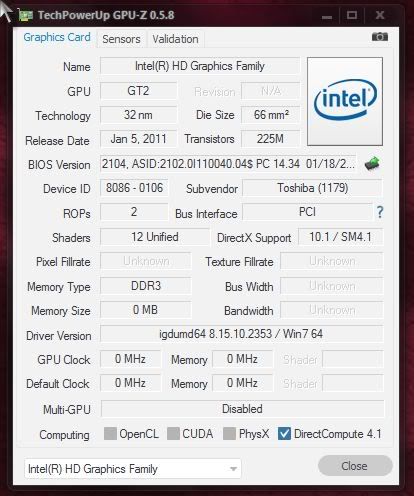
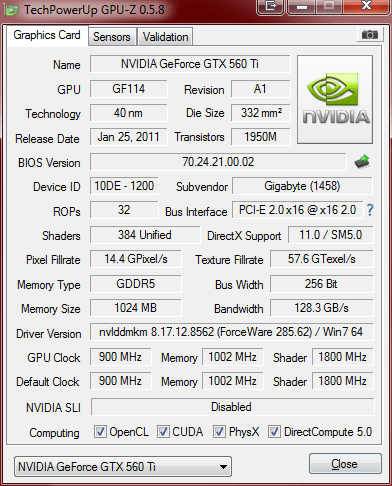
Anyway, this utility is free and it’ll give you all the info you want and need from your video card and GPU:


It scans your system (on installation) and reveals the name of your card, GPU, BIOS version, ROPs ("Raster Operation Unit" or "Render Back-End Unit". A raster graphics function used (per pixel) in a Bit blit operation to combine two or more bitmaps, on a GPU- the final stage of pushing pixels to your screen. ROP's are the units that perform tasks such as colour tests, filtering and AA), memory type and size.

This is very handy info to have when you go looking for updates, and to see if that game is overtaxing your GPU without guessing… and what’s really nice is that it’s all in one place.

Main Features:

  • Support NVIDIA and ATI cards
  • Displays adapter, GPU and display information
  • Displays overclock, default clocks and 3D clocks (if available)
  • Validation of results
  • No installation required
  • Support for Windows 2000 / XP / Vista / Windows 7 (both 32 and 64 bit versions are supported)

What's new in this version:

  • Added explanation about PCI-Express power savings and 3D render test to accurately measure bus config under load
  • Added function to display ASIC quality for Fermi and Southern Islands. (Located in the GPU-Z system menu)
  • Fixed crash on older ATI cards
  • Added voltage monitoring for HD 7970
  • Improved real-time clock monitoring for HD 7970
  • Fixed OpenCL detection for AMD Antilles, Whistler, Seymour, Blackcomb
  • Improved default clock reading for AMD HD 7970 and Fusion
  • Added support for AMD FirePro V7900, HD 6930, HD 7690M, HD 6410D
  • Fixed Intel Sandy Bridge IGP to be DirectX 10.1, 32 nm
  • Added support for NVIDIA Tesla C2075, GeForce GT 630M

                    - http://www.techpowerup.com/gpuz/

Download:  http://www.techpowerup.com/downloads/2092/mirrors.php

Source:  http://www.neowin.net/news/gpu-z-058

50,804 views 22 replies
Reply #1 Top

I've been using this for a while to compare my various video cards. Still wish I had the old P2 working, I would love to see what the stats of my ancient SiS315. I've had some troubles with it in the past, like the render test crashing the card, or the temperature not displaying properly, although that last thing was on a burned out card.

Currently, until I fix the better PC, I'm sporting this beauty. 


Reply #2 Top

Interesting little program........ Thanks Doc! B[]

Reply #3 Top

My little card humming along happily...;)

Reply #4 Top

Welcome, Bry!

Glad to see folks taking good care of their stuff.  :thumbsup:


Reply #5 Top

I agree, great little utility. For the equivalent for your CPU there is  CPU-Z  I run them from a flash drive along with other troubleshooting/clean out apps as they do not require installation,

+1 Loading…
Reply #6 Top

Wiz, that's a good little app.

Unfortunately, when downloading from Filehippo, I got this:

Probably included that since you picked yours up.

So, as usual, pay attention when installing, folks and when given the option, choose "Advanced" because that will give you control over each step and prevent surreptitious installation of toolbars and prevent browser and home page jacking.

Reply #7 Top

Thanks for the heads up, Doc. I guess some other things changed since I last downloaded it.

From their site: Since version 1.51, CPU-Z includes an installer. The installation offers several advantages in comparison to the stand-alone version :

(yeah,like crapware)

So much for being portable. :annoyed:

The installer doea have the options you show. They are added by the developer and included in the dl from the home page. :thumbsdown:

, AFAIK, Filehippo does not use the same tactics as c|Net.

Reply #8 Top

Quoting DrJBHL, reply 6
Unfortunately, when downloading from Filehippo, I got this:
End of DrJBHL's quote

Have download it from the original site ( http://www.cpuid.com/softwares/cpu-z.html  ) some time ago and have the same that you...

CPU-Z ( with HW monitor ) was used for monitoring the over-clocking world record :

Reply #9 Top

It does, unfortunately... both from the dev site and from filehippo...

This happens because the devs have to earn a living, and get a payment for each "wrapped" dl... which pays for the "free" in "free app".

Reply #11 Top

Quoting Thoumsin, reply 8
Have download it from the original site ( http://www.cpuid.com/softwares/cpu-z.html ) some time ago and have the same that you...
End of Thoumsin's quote

Just download the ZIP instead of the installer. There's nothing to install anyway, it's just a standalone executable.

Reply #12 Top

Quoting kryo, reply 11


Quoting Thoumsin,
reply 8
Have download it from the original site ( http://www.cpuid.com/softwares/cpu-z.html ) some time ago and have the same that you...


Just download the ZIP instead of the installer. There's nothing to install anyway, it's just a standalone executable.
End of kryo's quote

Which makes the "wrapper" all the more obnoxious (though understandable).

Reply #13 Top

Quoting Jafo, reply 3
My little card humming along happily...
End of Jafo's quote

Driver 267.91

Quoting Gwizz41, reply 10
Dell XPS M1710 .....time flies!
End of Gwizz41's quote

Driver 179.48

For info, last nvidia driver for windows is 285.62 from end Oct 2011 ( 290.53 beta ) and 290.10 for Linux ( end nov 2011 )... same if you have a older card like in the second case, it is always a good idea to keep driver updated at the last version... not only some bug problem are resolved but performance increase with newer driver...

example for the 285 series compared to the 280 series : http://www.nvidia.com/object/win7-winvista-64bit-285.62-whql-driver.html

Reply #14 Top

I dood it.

Reply #15 Top

Nice utility Doc...glad I saw this post.

Now I can see the load on my GPU while playing Skyrim.

Now to see if I can squeeze out a little more performance out of it.

Reply #16 Top

I've been using this and CPU-Z for years.. highly recommend both for monitoring your system.

Reply #17 Top

Quoting CarGuy1, reply 15
Nice utility Doc...glad I saw this post.

Now I can see the load on my GPU while playing Skyrim.

Now to see if I can squeeze out a little more performance out of it.
End of CarGuy1's quote

"Crispy" odor in 3...2...1....

Hey! Capture a vid of it.... could make a cool dream with the whispy smoke.... ;) j/k. Mike. Just my way of saying, "Be careful, CG1."

Glad you liked something I reported. :)

Reply #18 Top

Quoting Thoumsin, reply 13
Quoting Jafo, reply 3

My little card humming along happily...

Driver 267.91
End of Thoumsin's quote

Yes, Thoumsin....I know it's a little out of date....but I usually tend to run a new card with the bundled drivers for a while...to gauge reliability etc...then update....;)

Reply #19 Top

Hehe, I've been using the same driver for my card for the last three years, but for a different reason. They stopped making them. On the plus side, whenever a game tells me to make sure I've got the latest driver, I laugh in it's face. XD Also, it's an ATI card, so changing drivers in itself is an adventure with more thrills and scares than poking inside a faulty PSU.

Reply #20 Top

ZAP!   :)

Reply #21 Top

Quoting Wizard1956, reply 5
I agree, great little utility. For the equivalent for your CPU there is  CPU-Z  I run them from a flash drive along with other troubleshooting/clean out apps as they do not require installation,
End of Wizard1956's quote

Pay attention on install or you'll have the Ask.com browser toolbar and default search added.  It is an option you can reject on install--just a head's up.  It's a great program.

Reply #22 Top


Quoting Jafo, reply 3
My little card humming along happily...
End of Jafo's quote

Little?? :P

And thx Doc, great app, i had been using CPU-Z for many years and this will complement it nicley.

Another app i use to watch over my system is CoreTemp. It's very simple but has some handy bits of info in there.

Core Temp - Website Don't download from here, comes packaged with an updater.

PC World Installer, be sure to uncheck the search bar add-on during install.