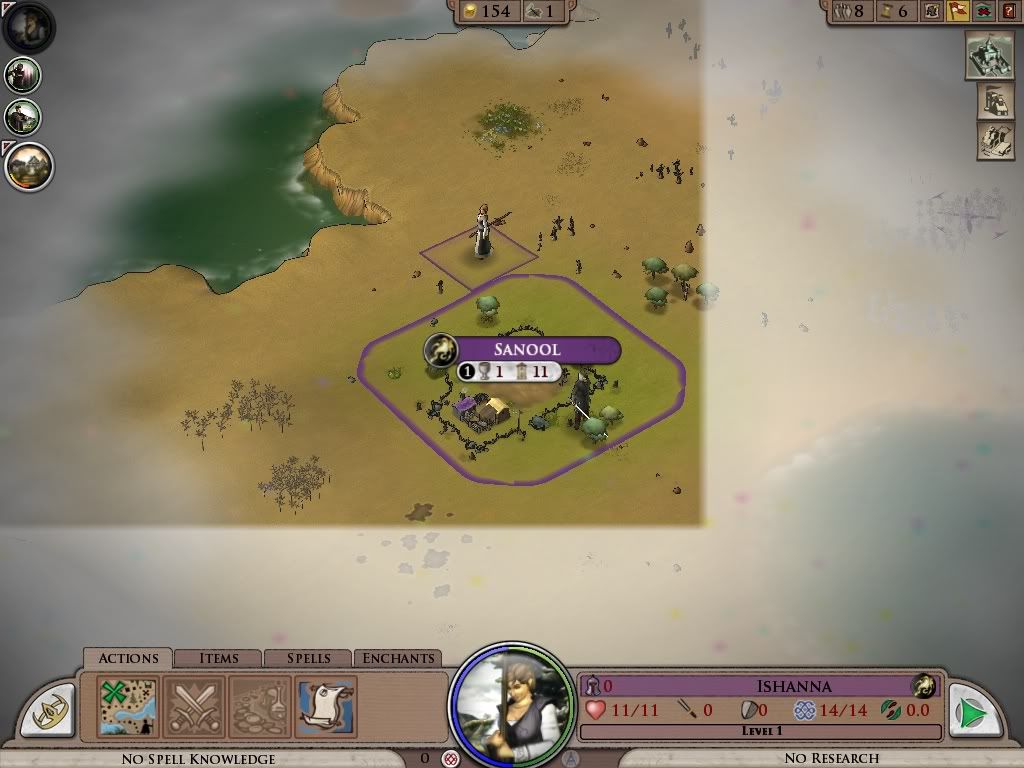
With the game half responding now, I can actually delve into it some.

I ran into this while playing (still playing, but Alt-Tab out to post this).


Map Error

2,673 views 11 replies
Reply #1 Top

I have other graphics problems in the same shape but of different color as posted here:

http://screencast.com/t/NTJlOWIwYj

ATI 4850 512MB.  I've tried different GFX setting (but not windowed mode) to no effect.


Reply #2 Top

I've got what LeBlaque has, quite often.  Moves around.


XP sp3 , 32-bit, 3gb ram.   ATI 5600 with current drivers.

"advanced lighting" off (or it gets even worst).

Reply #3 Top

Yeah, I have advanced lighting off too - imagine would be too blurry with it on.

Never saw what LeBlaque has though, that's way too freaky.

Reply #4 Top

Never saw what LeBlaque has though, that's way too freaky.
End of quote

Mayve it is the same thing: he is on cloth map and the OP on the 3D map.

Reply #6 Top

I have same problem. I guess they will fix it for the next round of testing.

Reply #7 Top

I get it too. Also, sometimes the roads graphics get all glitched and start appearing everywhere.

Reply #8 Top

I can reproduce this on my game.


I get the problem with the corrupted graphics (it seems I get some random corruption) by viewing the Kingdom details. The corruption is in the window that shows what your peasant looks like and then when I go back to the map, I'll get the same corruption but all over the whole screen.

Reply #9 Top

Never saw what LeBlaque has though, that's way too freaky.

Mayve it is the same thing: he is on cloth map and the OP on the 3D map.
End of quote

It's not. Note that the OP's is a texture overlaid over the entire image (different angle than the map grid and you can see regular tiles/fog under it), not a fogging of particular sectors on the map as everyone else is reporting.

Everyone: link your debug.err files. If it's a graphic issue, driver version, video card type, etc., may be relevant.


Reply #10 Top

debug.err linked


Got it again, and notice the corruption is also on the images for the NPC cards that show up when you hover your mouse over the NPC on the map. The portrait will already have corruption.


Reply #11 Top

jerome736's 2nd picture is VERY familiar to  me.

XP sp3, 32 bit, 3gb ram, ati 5670 512mb ram, current 10-6 drivers.


having trouble with pastebin, but here is the start of a recent debug.err

DebugMessage:  Version 0.805 last updated on: Wed Jun 30 21:36:52 2010
DebugMessage:  Entering WinMain
DebugMessage:  ******* Starting Game Shell *******
DebugMessage:  *********DXDiag info follows.*********
System Info
Time: 7/5/2010, 22:15:12
DirectX Version: DirectX 9.0c (4.09.0000.0904)
Machine Name: SYS-3
Operating System: Windows XP Professional (5.1, Build 2600) Service Pack 3 (2600.xpsp_sp3_gdr.100216-1514)
Languages: English (Regional Setting: English)
System Manufacturer: Intel
System Model: DP35DP HD/FP Audio
BIOS: Default System BIOS
Processor: Intel(R) Core(TM)2 Duo CPU     E6750  @ 2.66GHz (2 CPUs)
Physical Memory: 3054MB RAM
Page File: 664MB used, 8335MB available
Windows Dir: C:\WINDOWS


Display Info
Display device 1:
Device Name: \\.\DISPLAY1
Card Name: ATI Radeon HD 5600 Series
Manufacturer: ATI Technologies Inc.
Chip Type: ATI Radeon Graphics Processor (0x68D8)
DAC Type: Internal DAC(400MHz)
Key Device: Enum\PCI\VEN_1002&DEV_68D8&SUBSYS_20081787&REV_00
Display Memory: 512.0 MB
Current Display Mode: 1920 x 1080 (32 bit) (60Hz)
Monitor Name: Plug and Play Monitor
Monitor Max Resolution: 1600,1200
Driver Name: ati2dvag.dll
Driver Version: 6.14.0010.7093
Driver Date: 5/27/2010 09:58:50
DirectX Acceleration Enabled: Yes